
Most tools for support raising begin with money.
That makes sense. A missionary or campus staff member needs to know what support has been promised, what has arrived, and what still needs to be raised.
But a supporter network is not only a financial structure. It is a group of people who know you, pray for you, give sacrificially, ask about your family, and make your ministry possible.
Ministry Margin Partners is built for that side of the work.
You can keep the finances in a spreadsheet or in the system your organization already uses. Partners gives you a private place to remember the people behind those numbers, stay in meaningful contact, pray for them, and plan time together.
This is a complete walkthrough of how the app works.
01
Begin with the people, not the pipeline
Partners is not a donor CRM, a giving platform, or a fundraising dashboard. It does not process donations or try to tell you how successful a relationship has been.
It begins with a simpler question:
What would help me remember this person well the next time I call, pray, or visit?
That may include the name of a church, the work someone does, how you first met, the names of family members, a shared interest, a birthday, or the last thing they asked you to pray for.
None of those details are complicated. Remembering them is one of the ordinary ways we show people that a relationship matters.
02
Build a private supporter directory
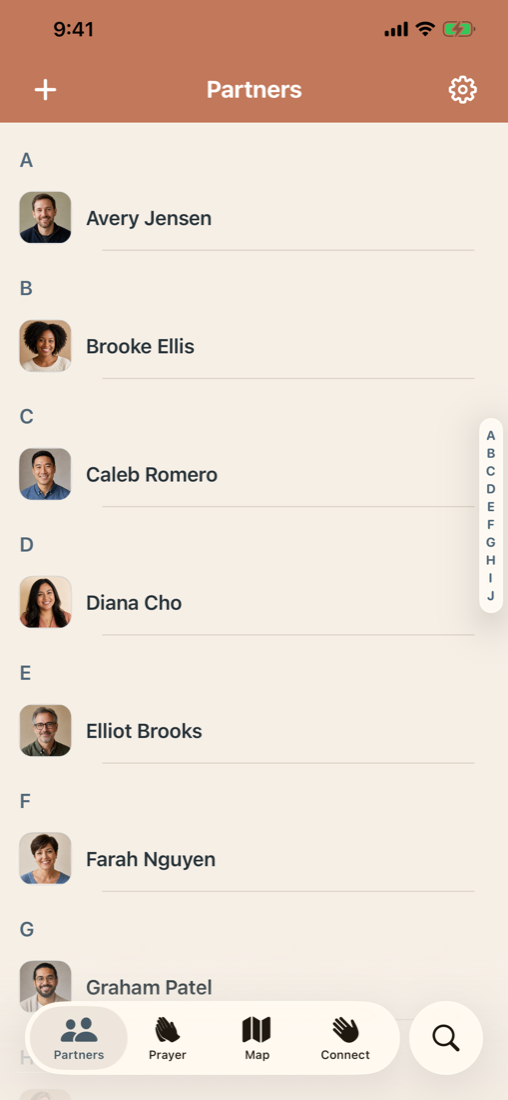
When you first open Partners, you can add someone manually, import individual people through Apple's private Contacts picker, or choose one or more Apple Contacts lists to review for import.
Nothing is pulled in silently. You choose the people, review the information, and decide what belongs in Partners. Once imported, the record becomes part of your app-owned directory. Changes you make in Partners never write back to Apple Contacts.
This separation matters. Your Contacts app may hold an old address or a mixture of personal and ministry information. Partners gives you a focused directory that you can shape around the relationships connected to your ministry.
You can search the directory, move through it alphabetically, open a profile, and call, text, email, or get directions from there.
03
Remember what matters before you reach out
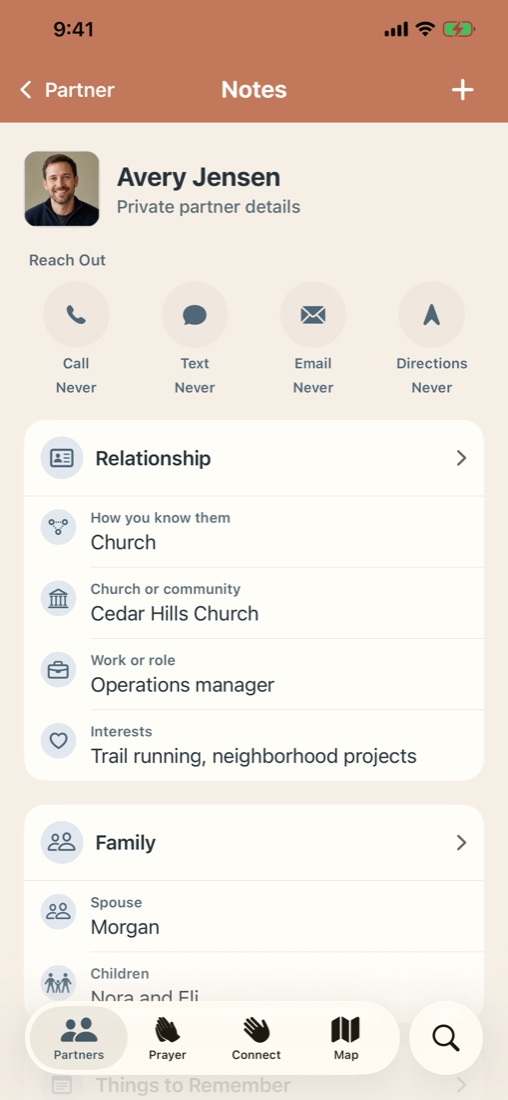
A contact card tells you how to reach someone. Partners also gives you a place to remember the context around the relationship.
You can record a church or community, work, interests, family details, birthdays and anniversaries, how you know one another, and an approximate support commitment. Every field is optional. The goal is not to complete a form. The goal is to keep the few details that will help you pick up the next conversation where the last one ended.
Each profile also includes private notes and a lightweight history of the contact actions you begin from the app. If you start a call, text, email, or directions request, Partners records the kind of action and when it began.
It does not pretend that opening another app proves a conversation happened. It gives you an honest record of the step you took, and lets you add the human context yourself.
04
Know who may be worth contacting next
When a supporter list gets long, good intentions can become uneven attention. A few people come quickly to mind. Others can go much longer without hearing from you, even when the relationship still matters.
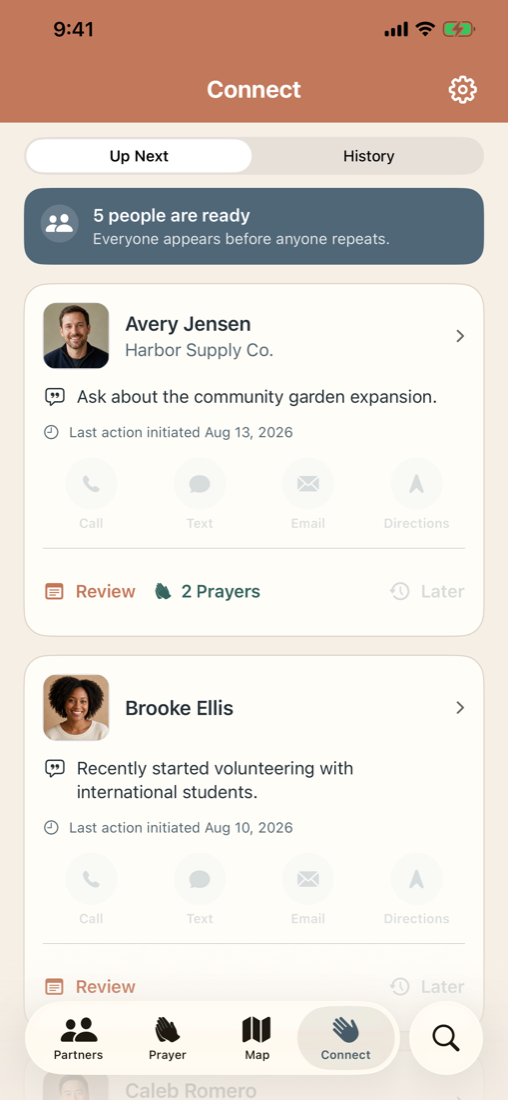
Connect keeps track of who you have not reached out to recently and continually suggests a random group of five partners. You can review the details and prayer requests you have saved, then call, text, email, open their notes, or move someone later in the current round.
After a call, text, or email begins, Partners asks whether you meaningfully connected. If you say yes, that person moves forward in the round. If not, they remain available for another attempt.
Everyone has a chance to appear before anyone repeats. When you have made it through your whole network, Partners tells you the round is complete and lets you begin again with a newly randomized list.
This is not a score and it is not an overdue warning. It is a gentle way to keep the whole network in view so no one quietly falls through the cracks.
05
Partnered in prayer
The people who support your ministry often remember you and your work in prayer. Partners helps you care for the needs of your network by remembering what they have asked you to pray for.
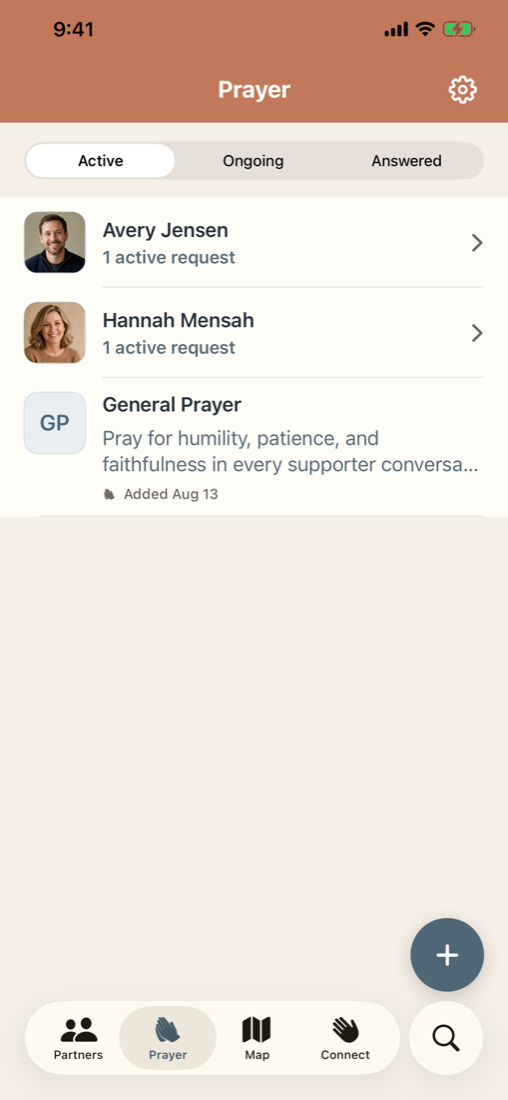
You can keep prayer requests with a partner's profile or add a general request for the wider work. Requests are organized as active, ongoing, or answered, giving you a simple way to return to them over time.
When something changes, you can update the request, mark it answered, or open the person's profile when it is time to check in.
Prayer is not another contact metric. Partners simply helps you remember the need, pray faithfully, and follow up with the person who shared it.
06
Plan visits around the people
Supporters may be spread across a city, a state, or several countries. When a trip begins to take shape, a list of postal addresses does not always make the opportunities obvious.
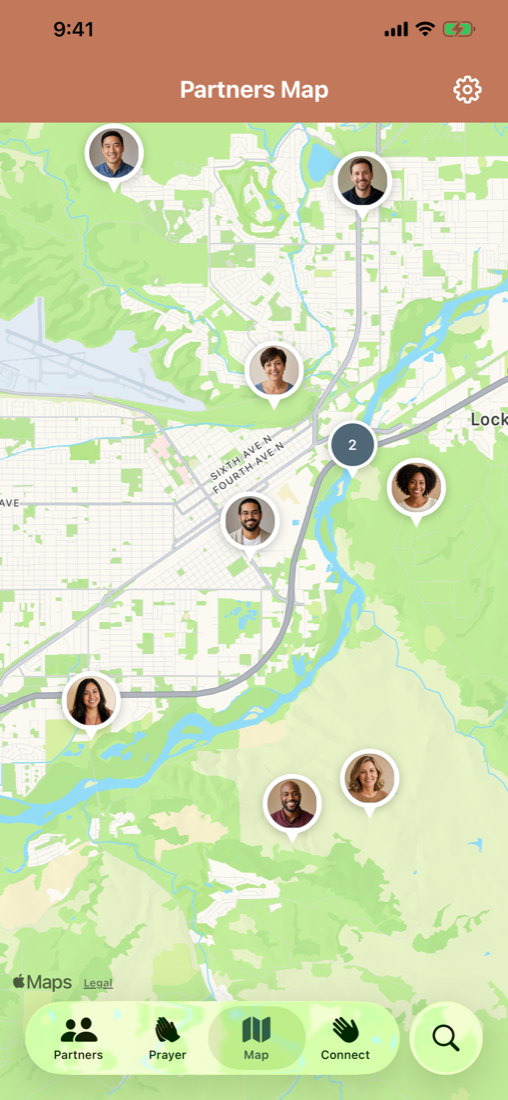
Partners Map gives the saved addresses in your directory a geographic view. You can see where partners are located, open a person from the map, and use Nearby to see who else may fit naturally into the same support-raising trip or personal visit.
The map does not use your current location. The first time you prepare it, Partners explains that saved addresses will be sent directly to Apple for geocoding and asks for your permission. Resolved map information remains in a protected local cache that you can clear from Settings.
07
Useful offline. Private by design.
Missionaries and support-raised workers are not always somewhere with dependable Wi-Fi or cellular service. Partners keeps its directory and care information on the device, so the app remains useful offline.
There is no Ministry Margin account to create and no Ministry Margin server holding a second copy of your supporter network. Partners includes no ads, behavioral tracking, app analytics, third-party diagnostics, or AI features that receive your ministry data.
If you enable iCloud sync, your app-owned partner details, notes, prayers, interactions, and Connect round can sync through your private Apple account using a Partners-only iCloud database. If you leave sync off, that information remains on the device.
Your own device security still matters. Use a strong passcode and Apple Account security, and store only what is prudent for the place where you serve.
The complete privacy policy explains these boundaries in more detail.
08
One app for the relationship side of support raising
Partners is designed first for iPhone because that is usually the device already with you when someone calls, sends an update, or comes to mind.
It also runs in compatibility mode on iPad and supported Apple silicon Macs. It is not a separate native iPad or Mac app, but it can be a useful larger window into the same information when iCloud sync is enabled.
Ministry Margin Partners is a one-time purchase with no required subscription. Launch pricing is $4.99 in the United States for the rest of 2026, with prices localized by Apple in other countries and regions.
The app is intentionally focused. It will not replace your spreadsheet, donation platform, or sending organization. It gives the people side of support raising a place of its own.
Remember what matters. Pray for the people who pray for you. Stay connected across the whole network. Plan the next visit with the people in view.
Available now for iPhone
Supporter care made simple.
Build a private supporter directory, remember what matters, pray faithfully, stay connected, and plan visits.